Settings and limitations
Creating a CTG layer
You can use the Bob Project or the Francis Fox one to follow this section's subsequent lessons.
First, create a New Layer by clicking on the New button in the Timeline. Several opitons are available. Click on Colo & Texture Layer:
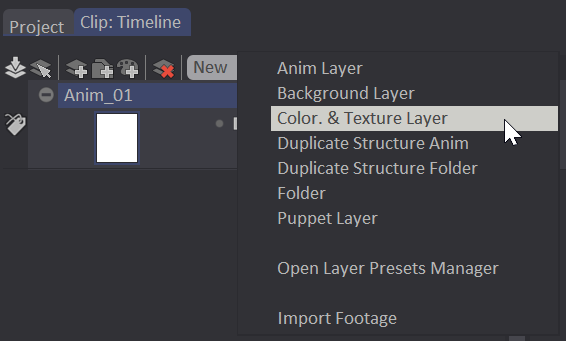
A new Layer, named COLO_Bob by default, will appear below the Current Layer. It will be a duplicate of this Current Layer, with the same number of frames and Instances, but empty Instances.
You can change this name, as for any other Layer, by double-clicking on its title. An alpha-numeric field appears, allowing you give a new name. You can also access this field by right clicking on the Layer : on the top of the menu, click on Rename Layer.
Should you wish to configure some preferences of a CTG Layer, you can open the Layer Preset Manager Panel.
Limitations of the Main Panel
Using a CTG Layer changes the options avilable in the Main Panel.
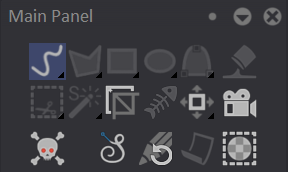
The following tools are the only ones available:
- Freehand Stroke and its One Point Dot and Dot (Filled Stroke is deactivated) tools.
- Crop tool
- Panning tool
- Camera
- Line Smoothing
- Stencils
If you click on one of the greyed out icons, a pop-up will warn you that you cannot use this tool with a CTG Layer:

Limitations of the Tool Panel
In the Tool Panel, your options are limited to two tools, tied to the Freehand Stroke:
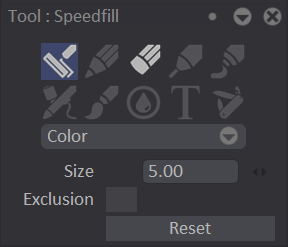
- The Speedfill (Squiggle)
 tool will help you colorize your animations.
 - The Eraser
 tool will only erase these Squiggles, not the color. Once you will have erased a Squiggle, the color will disappear or be replaced by the color of the dominant Squiggle.
Several settings are available:
- The only available Drawing Mode is the Color one.
- Size will let you change the dimension of the Squiggles and the Eraser, by using the adjacent numeric field or the mini-slider.
- Exclusion: only accessible when the Speedfill / Squiggle tool is chosen. This funciton will be explained later on.
- The Reset button resets the parameters to zero.
You can undo a Squiggle at any time by using the Undo ("U") shortcut. You can also use the specific Eraser tool to remove the Squiggle that no longer suits you.
Aspect and functions in the Timeline
CTG Layers will also look different than regular Animation Layers. They indeed appear larger than Animation Layers on your Layer Stack:
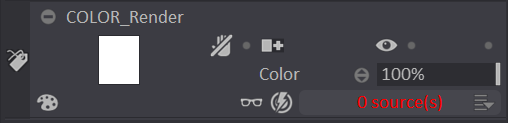
On the right, under the Opacity bar, the 0 source(s) (in red) give you access (thanks to a left click) to a list of sources that correspond to the other Layers in your Clip.
In our Bob Project, we only have one layer for the strokes (Lines). Check the small empty box and a ☑ will appear. Click on another location on the Timeline to close this list:
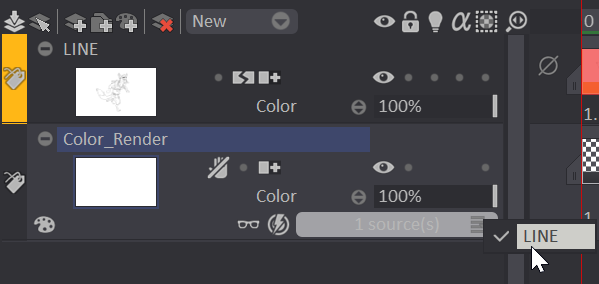
The "0 source(s)" label then turns into a white "1 source(s)" label:
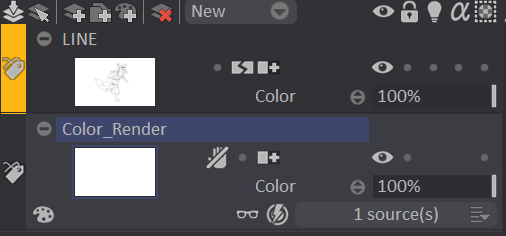
Our two Layers are now tied, for the Lines layer to act as a "border" to the colorization.
For other Projects, there might be several sources. You can even choose several of them. Check each empty box and a ☑ icon will appear. Click on another location on the Timeline to quit this list.
You cannot change the Pre or Post-Behavior of a CTG Layer.