Rename, undo, save and reset settings
A left click on the triangle icon highlighted below opens up a contextual menu which may be used to Rename the current effect in the FX Stack, Create or Delete an FX Stack Keyframe, Reset the effect settings to their initial values, Duplicate or Delete the effect from your FX Stack:
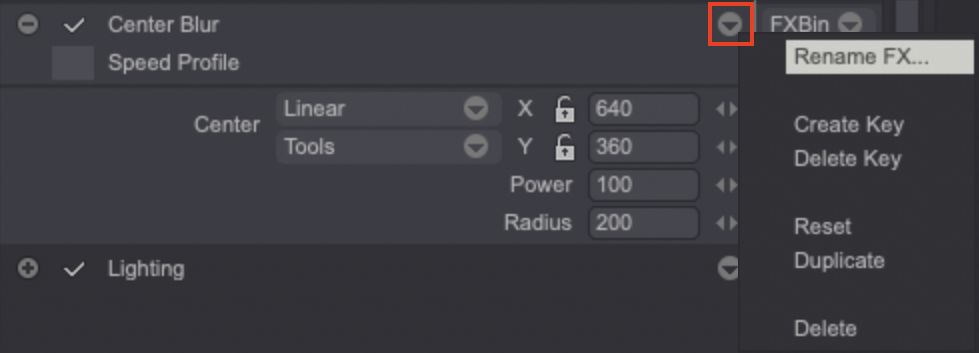
The Options menu of the FX Stack may be used to Delete or Reset the values of all your effects.
Undo/Redo with the FX Stack
It is possible to Undo/Redo all that has been done in the FX Stack through the dedicated buttons at the top of the FX Stack, near the Bin button: 
The Undo ([u]) and Redo ([Shift+u]) shortcuts are applied on the FX Stack if the Preview option in the FX Stack is enabled. Otherwise, they have their regular behavior.
Saving the FX Stack's settings
We have learned how to create and save our own Palettes, settings of custom tools, our pre-defined Gradients, etc. It is therefore only natural to proceed in the same way for our effects:
The FX Bin menu for each effect offers several options:
- The Add option allows you to store your effect for later use (you will first be asked to name this effect).
- The Export option saves the current effect to a storage support.
- The Import option recovers an effect from a storage support.
Resetting TVPaint's configuration will delete all user-defined effects.
The FX Bin menu for the entire Stack works in the same way, but may be used to add, import or export an entire Stack.
When you add an effect to a pre-defined FX Stack, all Keyframes and Profiles relative to the progression of each effect you have created are also saved.