Available actions
Various Actions can be added. You can:
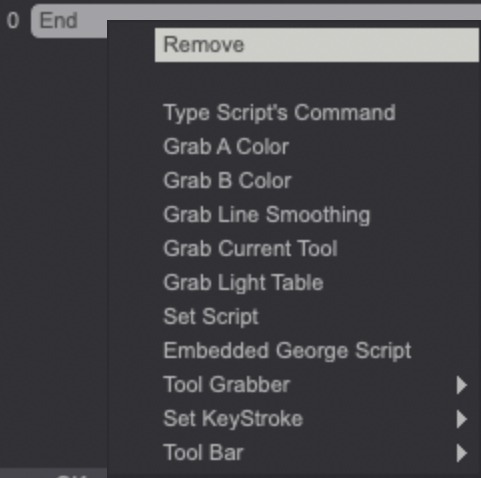
- Type a Script's Command (for example : TV_Circle, etc ...)
- Insert (an additional) Command (only appears by selecting an already created Type Script's Command action).
- Grab the A Color, B Color, Line Smoothing, or the Current Tool.
- It is possible to Grab the Light Table.
- Set a (George) Script.
- You may call up a George script as an Embedded George Script.
- The Tool Grabber menu offers several Actions. You can grab the Current Tool without the selected colors or the Tool as well as the A, B or A&B Colors. You can also choose to save the A or B colors only (and giving them a name or not) or both colors (and giving them a name or not).
- Set KeyStroke: select a shortcut to be called.
- The Tool Bar menu allows you to create dependencies between your Panels. You may display secondary panels from the Main Panel, for example.
- Remove the current command.
info
George Scripts and commands are reviewed in a specific section of the user manual.